Networking
Network Upgrade Indianapolis: Small Business Plan for Offices
A practical networking upgrade plan for Indianapolis small businesses that need reliable Wi-Fi, VoIP, and camera bandwidth.
A practical networking upgrade plan for Indianapolis small businesses that need reliable Wi-Fi, VoIP, and camera bandwidth. If you are trying to forecast the project window, this page breaks the job into the steps that usually control the schedule.
One of the most common questions we hear is how long it takes to implement a new networking system in a small business. The honest answer is that the timeline depends on cabling condition, device count, and whether you can stage the cutover before go-live.
Use it as a planning worksheet, a training piece for new managers, or a checklist alongside our security and networking services.
Key takeaways
A practical networking upgrade plan for Indianapolis small businesses that need reliable Wi-Fi, VoIP, and camera bandwidth.
- Audit coverage, cabling, and device counts before buying hardware.
- Segment POS, staff, guest, and camera traffic to reduce risk.
- Monitor and update gear so downtime never surprises the team.
Start with a quick audit: network upgrade Indianapolis
Ten minutes of documentation prevents weeks of headaches.
- List every device type: POS, phones, cameras, printers, and guest users.
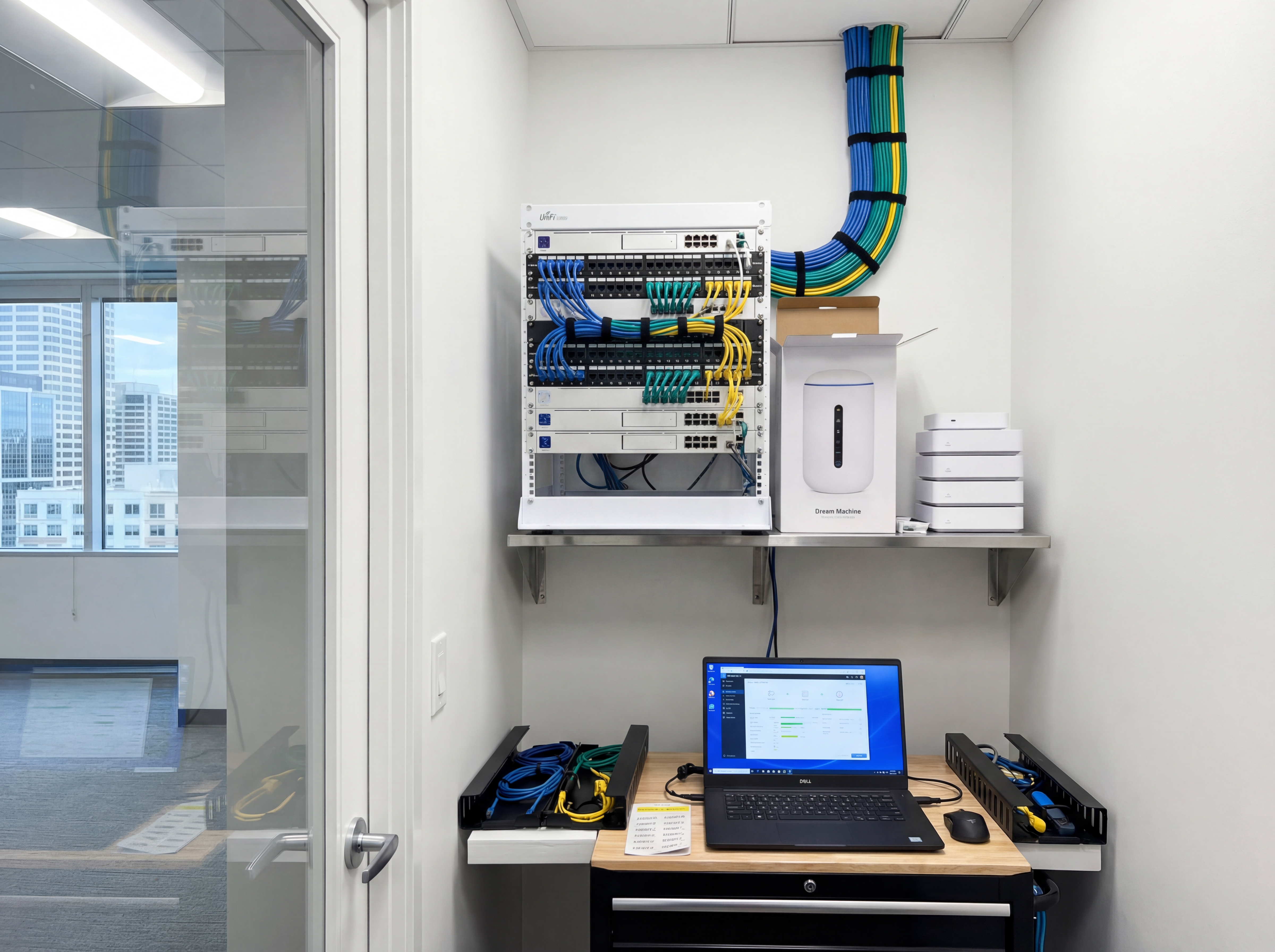
- Check cabling quality and where PoE or fiber is needed.
- Measure Wi-Fi coverage at registers, conference rooms, and break areas.
Build a stable foundation
Standardize now so your next hire or location is easy to support.
- Use Ubiquiti or similar gear for unified management and alerts.
- Create VLANs for cameras, POS, staff, and guests with clear policies.
- Schedule quarterly updates and backups of configs.
How long does it take to implement a new networking system in a small business?
Most small-business projects take anywhere from a few days to a few weeks from survey to handoff. The cutover itself may only take a night or a weekend, but planning, staging, and validation often decide whether the rollout feels smooth or chaotic.
- Discovery and site walk: usually 1 to 3 business days depending on access, drawings, and decision speed.
- Design and parts approval: usually 2 to 5 business days for hardware choices, port counts, and final scope.
- Staging and preconfiguration: usually 1 to 2 days when gear is in hand and templates are clear.
- Install and cabling: often 1 day for a small office, longer for hard ceilings, warehouses, or messy closets.
- Testing and handoff: usually same day or next day once Wi-Fi, VLANs, printers, phones, and failover are verified.
Tools, metrics, and templates
Bring data to every decision. Track adoption, uptime, and ROI so stakeholders stay aligned.
What to monitor
- Uptime and alert responsiveness
- Bandwidth and storage utilization
- User access changes and audit logs
- Ticket patterns and recurring fixes
Keyword & intent targets
- network upgrade Indianapolis
- small business Wi-Fi
- Ubiquiti installer Indy
- VLAN setup

Playbook: plan, deploy, maintain
Use this rollout outline to keep the implementation timeline predictable and to spot where delays usually start.
- Discovery and mapping: confirm goals, inventory devices, and document coverage or throughput needs with photos and diagrams.
- Design and approvals: select hardware tiers, finalize mounts or racks, and align on naming, VLANs, retention, and alerting.
- Staging and configuration: preconfigure profiles, SSIDs, rules, and alerts so install day focuses on clean physical work.
- Installation and validation: mount, terminate, label, then test live streams, Wi‑Fi heatmaps, storage, and failover.
- Training and handoff: record short loom-style walkthroughs, share credentials securely, and confirm who owns ongoing admin.
- Ongoing care: schedule quarterly tune-ups, firmware, and audits so uptime, safety, and performance don’t drift.
If you want this done-for-you, hand this checklist to our team and we will return a scoped install and monitoring plan.
Common mistakes to avoid
Most delays come from small oversights. Prevent them up front.
- Skipping a site walk: without photos and measurements, mounts, conduit, and cable paths get improvised on install day.
- Under-sizing power or bandwidth: PoE budgets, UPS capacity, and uplink headroom need headroom for growth.
- No naming conventions: unlabeled ports, cameras, SSIDs, or VLANs slow troubleshooting and confuse future admins.
- Forgetting user access: define who can view, export, or administer before launch to avoid security gaps.
Measurement and reporting
Report on outcomes so leadership sees ROI and teams stay funded.
Operational KPIs
- Uptime and mean time to restore
- Alert volume, false positives, and response times
- Storage utilization vs. retention targets
- Bandwidth headroom during peak use
Business KPIs
- Incident reductions and resolved tickets
- Safety/compliance milestones achieved
- Customer or tenant satisfaction scores
- Time saved on audits and investigations
Share a one-page monthly summary that highlights action items, blockers, and upcoming changes so every stakeholder stays aligned.
Indiana rollout plan for Small Business Networking Upgrade
Small Business Networking Upgrade works best when the rollout starts with the right topology. Map device density, work areas, and any camera or POS needs before ordering hardware.
A clear cabling plan keeps APs and switches where they should be, while VLANs protect sensitive traffic from guest networks.
We deliver Indianapolis and Carmel builds with labeled wiring, tested uplinks, and documented settings for easy support.
- Identify coverage gaps and dead zones in advance.
- Plan switch placement for PoE loads and uplinks.
- Separate business, guest, and IoT traffic.
- Standardize SSID naming and password rotation.
- Test bandwidth for video, VoIP, and cloud apps.
- Document maintenance windows and escalation steps.
Need help with the rollout? Schedule a network assessment.
Performance checklist for Small Business Networking Upgrade
Once the network is live, performance monitoring keeps Small Business Networking Upgrade dependable. Track usage by zone, watch for interference, and adjust AP power to keep coverage consistent.
A documented support plan keeps staff moving if something breaks. That matters for Indiana businesses that rely on cloud apps, cameras, and VoIP.
- Baseline upload and download speeds by site.
- Check roaming performance and handoff quality.
- Audit switch ports and PoE budgets quarterly.
- Rotate passwords and refresh guest policies.
- Review device inventory and replace aging hardware.
- Document escalation steps for outages.
Need ongoing help? Use our support portal or request a site visit.
Need an Indy network partner?
We handle design, install, and monitoring so your team can stay productive.
Upgrade my networkApproval checklist for Small Business Networking Upgrade
Before approving Small Business Networking Upgrade, confirm the plan accounts for device count, coverage goals, and ongoing support. This keeps Indiana sites stable after rollout.
- Coverage map for work areas and parking lots.
- PoE budget for access points and cameras.
- Network diagram with VLAN segmentation.
- ISP backup or failover plan.
- Maintenance windows and update plan.
- Support escalation and response times.
We supply these artifacts as part of every network assessment.
Sowynet rollout plan for Small Business Networking Upgrade
We deliver a clean install with documented settings so Indiana teams can support the network after launch. Our process keeps disruptions low and performance high.
- Design review and device inventory.
- Infrastructure prep and staging.
- On-site install and validation testing.
- Training for staff and admins.
- Ongoing monitoring and support.
Ready to upgrade? Request a network consult.
Authority expansion
Maintain vs partial upgrade vs full network refresh
Pain: many Indianapolis businesses know the network is weak, but they do not know whether they need a tune-up, a selective replacement, or a full rebuild. That uncertainty delays decisions until outages force the issue.
| Option | Best when | Risk |
|---|---|---|
| Maintain current gear | Your switching, cabling, and access points are still stable and only need cleanup, firmware, or segmentation work. | You may keep deferring hardware that is already near end of life. |
| Partial upgrade | Coverage is weak in specific zones, PoE is short, or only some switches and APs are outdated. | Mixed hardware can create management complexity if standards are unclear. |
| Full refresh | Downtime is recurring, wiring is messy, or the business is expanding and needs a clean standard. | Higher upfront spend and tighter implementation planning. |
The right answer depends on coverage, cable condition, device count, and how much business risk an outage creates. The goal is not to replace everything. The goal is to remove the bottleneck that keeps operations unstable.
Local examples
How network upgrade needs change across Indianapolis small business types
Medical or professional office
Stable Wi-Fi, segmented traffic, and reliable VoIP matter more than flashy speed numbers. Downtime here usually means lost appointment flow.
Warehouse or light industrial site
Coverage across long spaces, break areas, cameras, and handheld devices is usually the real issue. Dead zones slow operations quickly.
Retail or restaurant group
POS, guest Wi-Fi, cameras, and staff devices need clean separation. One mixed network creates both security and support problems.
Scope clarity
What is usually included in a small business network upgrade
- Assessment scope: site walk, device inventory, coverage review, and topology planning.
- Infrastructure scope: switches, access points, firewall work, rack cleanup, and cabling where needed.
- Configuration scope: VLANs, SSIDs, firewall rules, naming standards, and monitoring setup.
- Support scope: testing, documentation, handoff, and optional ongoing monitoring.
This matters because many buyers ask for "better Wi-Fi" when the real issue is a mix of switching, wiring, guest traffic, and aging hardware. Clear scope prevents low quotes that turn into expensive change orders later.
Frequently asked questions
Common questions
Share these answers with stakeholders or assistants to speed approvals.
How long does a refresh take?
Many small offices can finish the physical cutover in one day, but the full project usually includes survey, approvals, staging, install, and post-cutover testing.
Do you support remote employees?
Yes. We configure VPN access and QoS for video calls.
What if we add cameras later?
We size PoE and bandwidth for future cameras so upgrades are painless.
How much downtime should we expect during a network upgrade?
Most small-business upgrades are staged around off-hours so the real interruption stays limited to the cutover window. Downtime grows when the project also includes recabling, firewall replacement, or ISP changes.
Should we replace cabling during the same project?
If cable quality or labeling is part of the problem, yes. New access points and switches perform best when the physical layer is also stable and documented.
Quick summary
Networking at a glance
Key points to share with teams before planning.
- Audit devices, cabling, and coverage first Audit devices, cabling, and coverage first.
- Segment traffic with VLANs and managed gear Segment traffic with VLANs and managed gear.
- Monitor and update quarterly to prevent outages Monitor and update quarterly to prevent outages.
Use this summary to give your team fast context.
Pain - Fix - Result Framework
Why small-business upgrades get delayed until they become urgent
Pain: Slow Wi-Fi, aging switches, and camera problems often get patched one by one until the network becomes unreliable everywhere.
Fix: Audit the environment, rank the business risks, and phase upgrades around the systems that affect service first.
Result: Better uptime, fewer emergency fixes, and a network roadmap the business can actually follow.
Next step
Use one roadmap for the next upgrade phase
Pair this article with the service page below to define what needs immediate replacement, what can wait, and how to phase the work.
That keeps the budget tied to business impact instead of guesswork.
It also gives owners a clearer picture of what comes next after the first upgrade.
Review networking supportRelated reading
Explore related guides and service pages
These links expand the topic and help readers compare practical next steps.
Loading related resources...
Loading recent posts...